

2,800-year-old seal with biblical symbols found in Israel

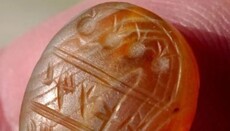
Israeli archaeologists have found a stone seal from the era of Judean kings with an inscription in ancient Hebrew.
A stone seal believed to have been used by a high-ranking administrative official during the time of the Kingdom of Judah in the late 8th century BC was discovered by the Israel Antiquities Authority (IAA) during excavations in northern Israel, reports The Jerusalem Post.
The seal, made of a light brown gemstone, is thought by archaeologists to have been “hung like a necklace around its owner’s neck” and is decoratively divided into three parts. Four pomegranates are carved into the upper section of the seal, while the other two sections contain an ancient Hebrew inscription reading: “Belonging to Makhach (son of) Amihai,” the IAA explained. According to archaeologists from the Israel Antiquities Authority, the owner of the seal lived during the time of Judean kings Jotham, Ahaz, or Hezekiah.
Specialists note that the find has unique significance, as it was discovered not from antiquities collectors, but during official excavations.
Pieces of jar handles bearing royal seals were also found at the site, impressed with the words “Belonging to the King” and the names of Hebron and the ancient city Ziph, two important administrative cities at the end of the First Temple period.
"Such seal impressions are a common find at biblical sites in the Judah region,” Gorzalczany said of the findings. “However, their presence at a site so northern, deep within the territories of the biblical Kingdom of Israel, is most surprising.”